
Register the website origin, generate the widget HTML in the correct workspace, and install that snippet on your website. Test the live page and confirm the conversation reaches your team.
Before you begin
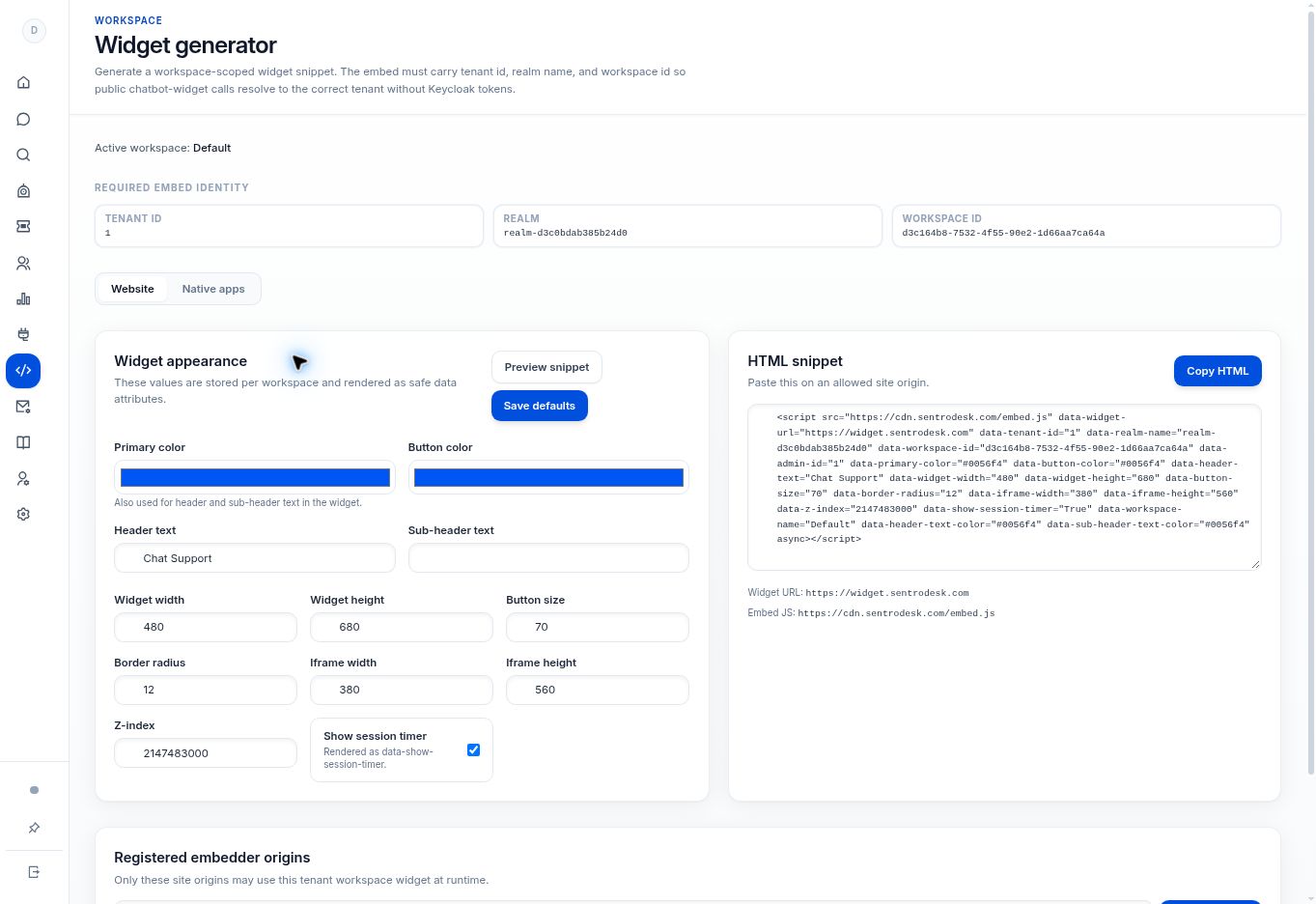
You need permission to manage the website and Widget generator. Use your own workspace’s generated identity values, not the values visible in a documentation screenshot.
Step by step
- Open Widget generator → Website in the intended workspace.
- Under Registered embedder origins, add the site origin used by your website. An origin consists of the scheme, hostname, and any explicit port, such as
https://www.example.com. - Adjust the appearance if needed and use Preview snippet. Select Save defaults if you want to persist those workspace defaults.
- Select Copy HTML in the HTML snippet panel. Add that generated script to your website through its approved code-insertion or deployment process.
- Open the actual registered site and test the widget. Check that the question appears in the intended SentroDesk workspace.
What to check
The customer can open the widget on the allowed site and the conversation reaches the correct workspace. Website code installation and registered-origin configuration are both required.
Need to troubleshoot?
The widget is blocked
Check the exact live origin, including www, subdomain, protocol, and port. Confirm it is registered for this workspace.
The wrong workspace receives chats
Regenerate the embed from the correct workspace instead of editing its identity values by guesswork.