
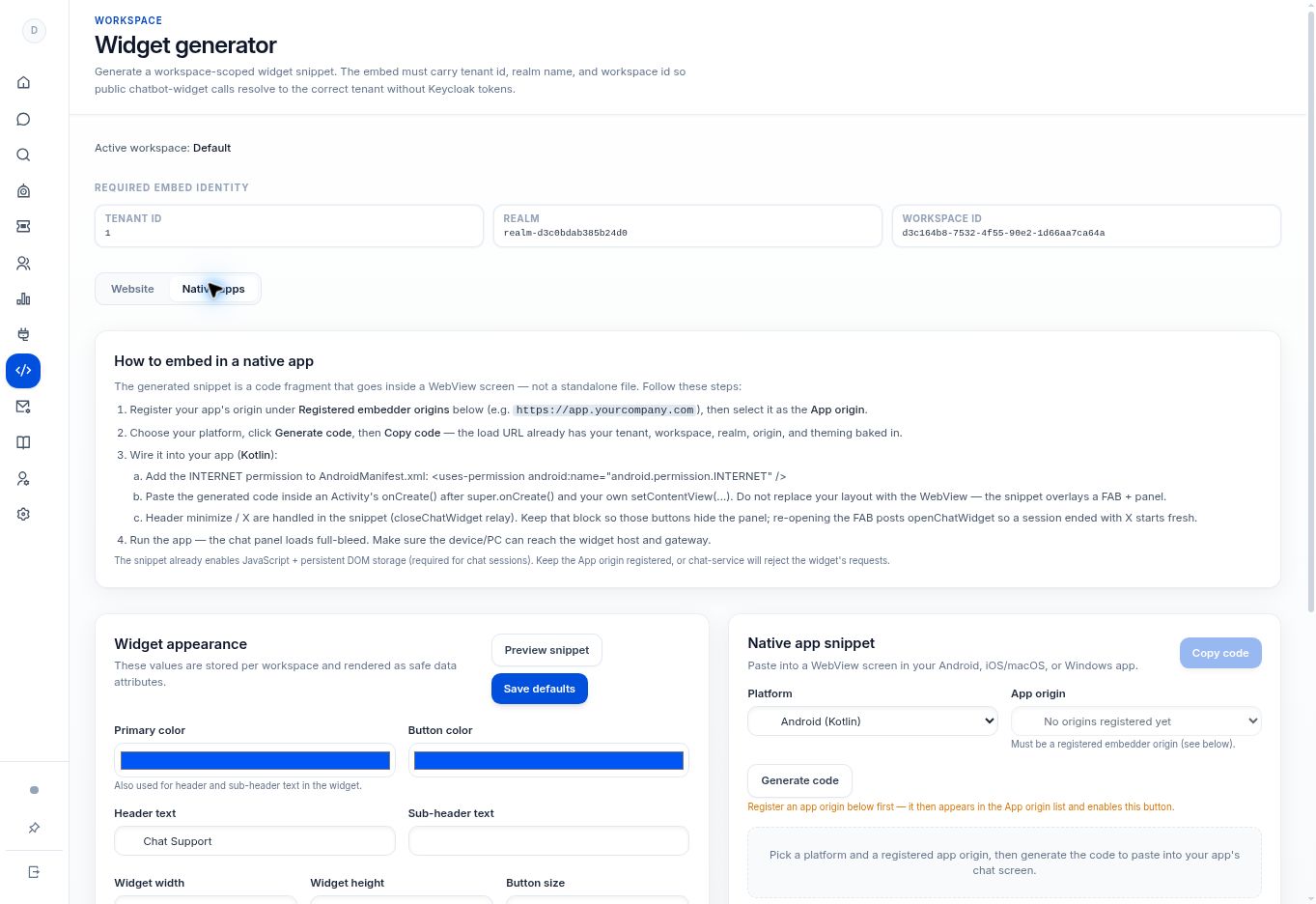
Use Widget generator → Native apps to select Android, Swift, or Windows and an authorized app origin. Generate a platform-specific WebView fragment for your developer to integrate and test.
Before you begin
You need a developer who can add a WebView screen to the app and a registered app origin. The generator produces a code fragment, not a standalone app or an unverified SDK package.
Step by step
- Open Widget generator → Native apps.
- Register the app origin and select it in App origin. Code generation is disabled when no eligible origin is available.
- Choose Android (Kotlin), iOS / macOS (Swift), or Windows (C#) in Platform.
- Select Generate code, then Copy code. The generated load URL includes the workspace identity, origin, and theming.
- Integrate the fragment into the appropriate WebView screen and test on a device that can reach the widget host and gateway. Preserve the generated session-storage and open/close behavior.
What to check
The app opens the intended workspace chat, retains the required session behavior, and correctly handles closing and reopening the panel.
Need to troubleshoot?
Generate code is unavailable
Register and select an origin first.
The screen is blank on a device
Check host reachability, WebView configuration, JavaScript, persistent DOM storage, and the exact registered origin. The generator’s instructions identify these prerequisites.