
Use SentroDesk-hosted publishing or configure a custom domain for the native Docs Site. A separate WordPress help center uses its own hosting and DNS configuration.
Before you begin
You need Docs Site access and at least one reviewed page. These settings do not deploy a separate WordPress installation.
Step by step
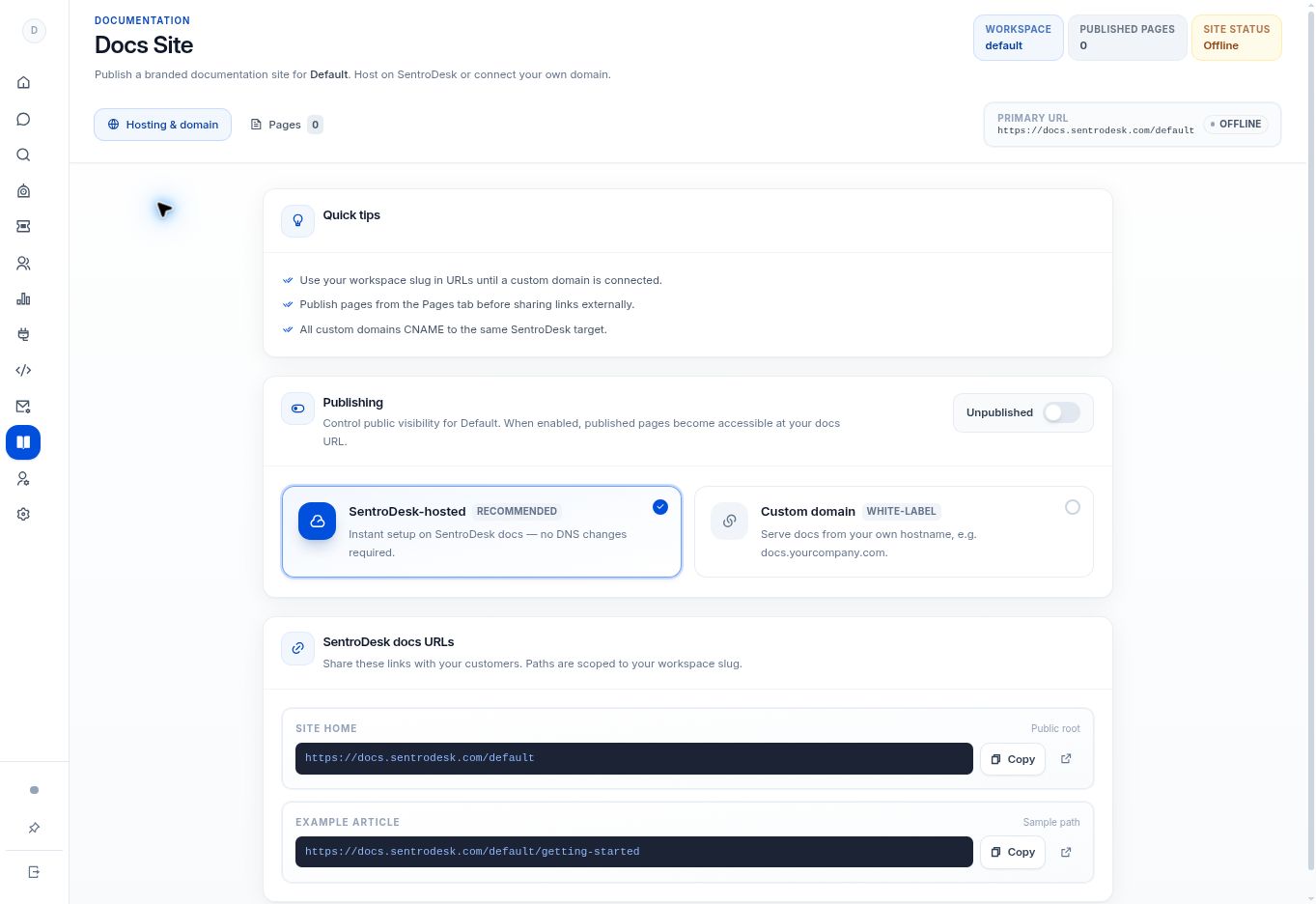
- Open Docs Site and review the hosting options and current online/offline status.
- Choose SentroDesk-hosted to use the displayed address under
docs.sentrodesk.com/{workspace-slug}. Copy the exact address shown for your workspace. - Choose Custom domain only if you control the desired domain and can complete its DNS and verification requirements.
- Review which pages have Published status. Keep unfinished pages in Draft.
- Enable site publishing when the address and content are ready, then open the public address in a separate signed-out browser to check it.
What to check
The site is online at the selected address and exposes only the pages intended for customers.
Need to troubleshoot?
The site says Offline
The site publish switch is off, or the hosting setup is incomplete. Check both before sharing the address.
I am hosting WordPress on a separate subdomain
Point that subdomain to your WordPress host using its instructions. Do not use the built-in Docs Site DNS target for WordPress.