
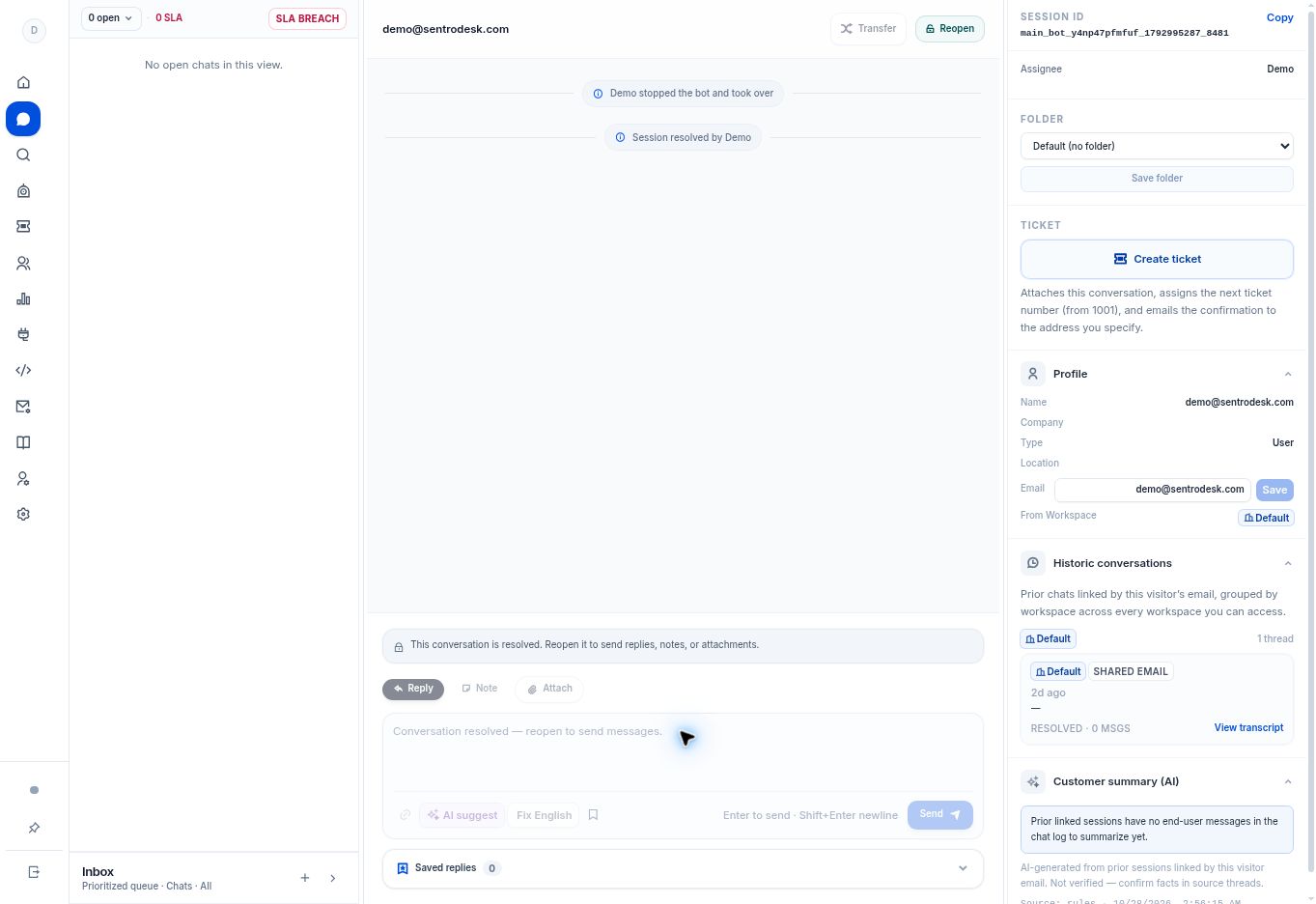
An agent’s Online or Away status affects availability for assignments. Transfer requires an eligible conversation and a receiving agent; a resolved conversation disables Transfer.
Before you begin
A transfer needs an eligible conversation and an agent who can receive it. Transfer is disabled on resolved conversations.
Step by step
- Check your presence control in the navigation rail. It distinguishes Away (not accepting) from Online availability.
- Open an active conversation and use Transfer in its header when the action is enabled.
- Review the available agent choice in the transfer flow. Agent lists and capacity are managed under Settings → Routing.
- An administrator can enable round robin for new assignments. The app skips Offline/Away agents and agents at their configured maximum concurrent chats.
- Confirm the assignee after a handoff. Review the thread before replying so the customer does not have to repeat the request.
What to check
The intended agent owns the conversation, with the earlier exchange available for context. Do not treat an Online indicator as unlimited capacity.
Need to troubleshoot?
No agent can receive the conversation
Check presence, capacity limits, workspace membership, and routing settings.
Transfer is disabled
Check the conversation state and your permissions. Do not reopen a finished thread solely to test routing.